
Allstate Mobile
The Allstate CorporationFinance
4.155.19K Reviews
- Version
- 21.6.1
- Installs
- 10.00M
- Age Rating
- Everyone
Screenshots
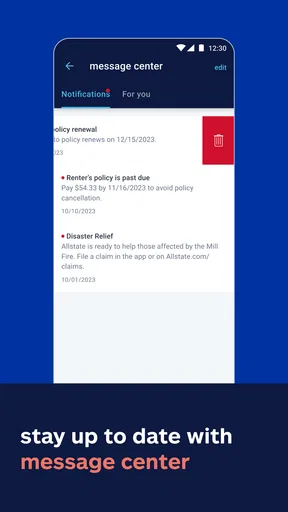
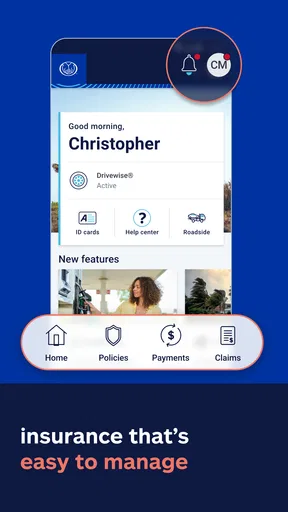

Our Review of Allstate Mobile
 Analysis by Appyee
Managing insurance from a phone sounds simple until you need something quickly: a digital proof of coverage, a policy detail, help after a collision, or a way to check what you are paying for. I spent time looking at Allstate Mobile as a practical finance app rather than treating it like a miniature version of the company website. My overall impression is that it is most useful when your insurance relationship is already with Allstate and you want everyday account access in one place.
The app is free, aimed at Everyone, and comes from The Allstate Corporation. It has been available since January 12, 2013, and its current version is 21.3.0. That long presence matters because an insurance app needs to feel dependable during unplanned moments, not merely attractive during a first visit. With over ten million installs, an average rating of 4.1, and a large body of user feedback, it is clearly a mainstream tool rather than a niche companion.
How clearly the app supports everyday insurance tasks
I find the most useful way to judge an insurance app is to ask whether it helps me reach the right information without adding confusion. In this section, I’m looking at how Allstate Mobile fits into ordinary account tasks and what I would check before relying on it away from home. That everyday foundation matters most when a more demanding situation makes a familiar next step valuable.
Readability and navigation in normal use
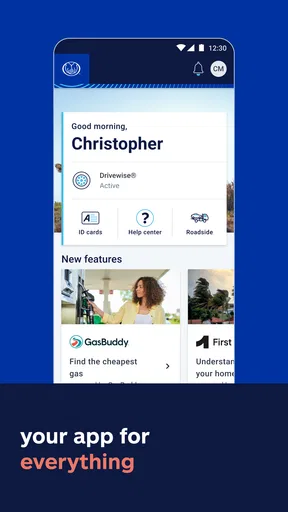
My first test with an insurance app is whether I can understand the opening screen without already knowing the company’s terminology. Allstate Mobile generally makes sense when approached as a customer dashboard: I expect to use it to reach policy information, account-related actions, and assistance connected with my coverage. That focus is more helpful than presenting a crowded collection of corporate services.
The strongest design choice is the idea of bringing routine insurance work into a phone-based space. Instead of searching through email or carrying paper documents, I can begin with the app when I want to check my relationship with Allstate. This is especially useful for people who prefer visual confirmation over remembering account details, or who find a browser’s multiple tabs and login pages tiring.
Readability is not only about font size. It also depends on whether labels describe the action in familiar language and whether important information is separated from secondary material. Insurance can be confusing even for confident readers because a policy contains coverage terms, limits, dates, deductibles, and account information. A mobile interface cannot remove that complexity, but it can reduce the effort of locating the next step.
I would still advise new users to take their time on the first visit. A quick scan is fine for finding the general area you need, but insurance decisions deserve more attention than a casual shopping app. If you are comparing coverage or trying to understand why a charge appears, read the surrounding details instead of relying on a prominent button or short label.
Useful for people who prefer a single starting point
For an Allstate customer, the main benefit is continuity. The same app can become the place I check before looking elsewhere, which reduces the mental load of remembering where a particular document or account action lives. That matters for people who manage insurance while working, traveling, caring for family, or dealing with several policies at once.
It is also a reasonable choice for someone who is comfortable with a phone but not with full websites. A dedicated app can feel less intimidating than a desktop portal because the screen presents fewer competing elements. On the other hand, people who need to compare several insurers, read long policy documents side by side, or perform detailed research may still prefer a browser and a larger screen.
One practical habit makes the app more useful: decide what you are trying to accomplish before opening it. “I need my policy information” is a better starting point than tapping around without a goal. For urgent situations, keeping your account access ready and knowing where assistance begins can save time when concentration is already limited.
Motor and sensory considerations
Phone-based insurance access can help users who find paper records difficult to organize or who need information available away from home. A digital account may be easier to keep with you than a folder of documents, and the compact format can support people who rely on one familiar device for communication, navigation, and financial tasks.
At the same time, a small screen creates its own demands. Reading policy language, checking several details, or entering information can require sustained visual attention. Someone with low vision may need to depend on the operating system’s text and display settings, and the experience will vary according to the phone, system configuration, and screen size. I would not assume that every part of an insurance workflow becomes comfortable simply because it is inside an app.
Touch interaction can also be a barrier for users with tremors, limited dexterity, or fatigue. Insurance tasks often involve selecting the correct option, entering personal information, and reviewing details carefully. A missed tap is more serious here than in a casual game. I found it sensible to use the app when seated, with enough time to check each screen, rather than trying to complete an important task while walking or handling other things.
For sensory comfort, the best approach is to combine the app with the phone’s built-in display and sound controls. Larger text, stronger contrast, reduced motion, screen magnification, or a quieter environment may make the experience easier, but these are device-level adjustments rather than promises that every screen will respond perfectly. Users who depend heavily on a screen reader or alternative input should test the specific actions they need before relying on the app during an emergency.
Situational access when life is busy or stressful
The most convincing use case is not a relaxed account check. It is the moment when I am away from my usual paperwork and need insurance information from my phone. A driver might be standing beside a vehicle after a minor incident, trying to stay calm while checking what help or account information is available. In that situation, having a familiar app can be less stressful than searching an inbox or remembering a web address.
Another realistic scenario is a household where one person handles insurance but another person needs access to relevant information while traveling. A mobile account can reduce dependence on a physical file at home. That does not eliminate the need to understand who is authorized to act or what information should be shared, but it can make the practical side of account access more immediate.
The app also suits people who move between home, work, and appointments. A desktop portal may be more comfortable for extended reading, yet a phone is usually the device already in a pocket. This difference is important: convenience is not just a feature list; it is the ability to begin a task in the place where the need occurs.
There is a trade-off, though. A stressful event is exactly when small interface decisions become difficult. Poor reception, a nearly empty battery, glare, wet hands, or divided attention can make any mobile workflow frustrating. I would not treat the app as the only preparation for a roadside problem. Keeping essential information available through more than one route is wiser than assuming a single phone app will always be reachable.
Where it compares well with usual alternatives
The usual alternatives are a mobile browser, a desktop account, phone support, email, and paper documents. Allstate Mobile has the clearest advantage over paper when I need information away from home, and it is more focused than opening a general browser and navigating through a full corporate site. It also gives people who prefer app-based routines a consistent place to begin.
A browser can still be better for long reading, printing, switching between several pages, or working with a keyboard. Phone support may be preferable when the situation is complicated, emotional, or too important to interpret alone. Paper remains useful as a backup for people who do not always have a charged phone or reliable connectivity.
The important distinction is that this app is not a replacement for insurance understanding. It is an access layer. If you are already an Allstate customer and want a convenient mobile route to your account, that is a meaningful advantage. If you are shopping across providers or want a neutral insurance-management tool, the app is not designed around that broader purpose.
Remaining barriers and points of friction
The first barrier is membership relevance. A person who does not use Allstate will gain little from installing a provider-specific finance app. Even for an existing customer, the value depends on whether the app supports the exact task at hand. I would not download it simply because I want general advice about insurance or a universal document wallet.
The second barrier is the language of insurance itself. A clean screen cannot make every coverage distinction obvious. Users may still need to contact Allstate or consult their policy documents when a decision involves exclusions, responsibility, claim details, or financial consequences. The app can help me reach information, but it should not encourage rushed assumptions.
There is also the ordinary risk of relying on a phone for access. A forgotten sign-in detail, a device problem, connectivity trouble, or an unfamiliar screen can block progress at the wrong time. My practical recommendation is to open the app before an urgent need arises, confirm that I can reach the account area, and learn the basic path to the information I expect to use. That small rehearsal is more valuable than discovering the workflow during a crisis.
Users with accessibility needs should apply the same test even more deliberately. Check whether text remains understandable at the preferred size, whether controls are easy to activate, and whether the actions you rely on work with your chosen phone settings. If a key task is uncomfortable or impossible, the better option may be a browser, telephone assistance, or help from a trusted person rather than forcing the app to serve as the only route.
Who should use it, and who should skip it
I would recommend Allstate Mobile to current Allstate customers who want a convenient phone-based starting point for account and insurance tasks. It is particularly sensible for people who travel, dislike paper filing, regularly misplace documents, or want one familiar place to check their coverage relationship. The free price removes a financial hurdle, although the real value comes from already being part of the Allstate ecosystem.
I would be more cautious about recommending it to someone with complex insurance questions, limited comfort with touchscreens, or a strong preference for large-screen reading. Those users may find a phone call or browser more suitable for important decisions. I would also skip it if I were looking for a provider-neutral finance app, because its usefulness is tied to Allstate rather than to managing every possible insurer.
For families and caregivers, the app may be helpful as part of a shared preparation plan, but I would avoid casually sharing login credentials. Instead, clarify who needs information, what should be accessible, and which tasks require the policyholder or account owner. That is a small but important distinction between convenience and safe account management.
My inclusive verdict after using it
Allstate Mobile succeeds best as a focused companion for people who already have Allstate insurance and want mobile access during ordinary life. Its greatest strength is contextual: the app is available when the paperwork is not. That can support users with different routines, reduce dependence on physical documents, and give busy customers a more direct path to their insurance account.
Its inclusive value is more practical than absolute. A phone interface may help one person avoid paper and help another manage insurance while away from home, yet it may create visual, motor, or cognitive strain for someone else. I appreciate the flexibility of using device settings and alternative channels, but I would still test the exact workflow that matters to me instead of assuming accessibility from the app’s existence alone.
With an average rating of 4.1 from over a hundred thousand ratings, the reception is positive without suggesting that every user has the same experience. That feels consistent with my view: this is a useful, established finance app, but not a universal answer to every insurance need. I would install it if Allstate were my insurer, prepare it before an emergency, and keep a browser or human support option available for complicated situations.
My bottom line: Allstate Mobile is worth using when convenience, portability, and a familiar insurance account matter more than extensive research or long-form document work. It supports several everyday contexts well, but inclusive access depends on the phone, the user’s abilities, and the availability of backup help. Used as one part of a sensible insurance routine, it can make important information easier to reach without pretending that a mobile screen replaces careful understanding.
Privacy and Permissions
See what permissions an app requests and how it handles your data.
- Calendar
- read calendar events plus confidential information, add or modify calendar events and send email to guests without owners' knowledge
- Location
- approximate location (network-based), precise location (GPS and network-based)
- Photos/Media/Files
- read the contents of your USB storage, modify or delete the contents of your USB storage
- Storage
- read the contents of your USB storage, modify or delete the contents of your USB storage
- Wi-Fi connection information
- view Wi-Fi connections
- Other
- view network connections, pair with Bluetooth devices, access Bluetooth settings, full network access, close other apps, run at startup, control vibration, prevent device from sleeping, read Google service configuration
Verdict
Strengths of Allstate Mobile
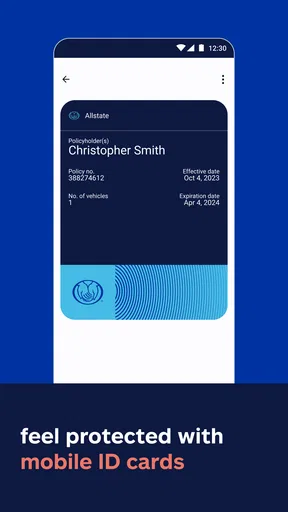
- Quick access to policy details, billing, claims, and digital ID cards.
- Photo-based claim reporting can simplify documenting vehicle damage.
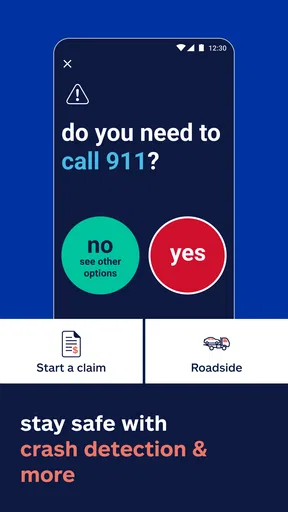
- Roadside assistance requests can be made directly from the app.
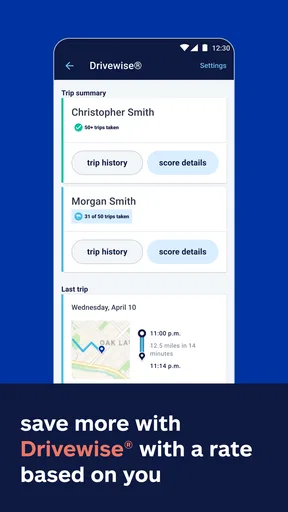
- Safe driving features may help eligible users track habits and earn discounts.
- Secure login helps keep personal insurance information in one place.
Limitations of Allstate Mobile
- Some features and discounts are limited to eligible Allstate policies.
- Claim estimates may require additional documents, photos, or adjuster review.
- Location and driving-data permissions can raise privacy concerns.
- App performance and available tools may vary by state and policy type.
- Certain account changes may still require contacting an Allstate representative.
Similar Picks in This Category
View All
Google Wallet
Google LLC4.3

Airtel: Recharge, Bank & Loans
Airtel4.0

PayPal - Pay, Send, Save
PayPal Mobile4.2

DANA Indonesia Digital Wallet
PT Espay Debit Indonesia Koe4.5

Binance: Buy Bitcoin & Crypto
Binance Inc.4.8

Cash App
Block, Inc.4.7
Frequently Asked Questions
What is Allstate Mobile, and what can I do with it?
Allstate Mobile is the official app for managing many Allstate insurance services from an Android or iOS device. After signing in, customers can review policy details, access digital insurance cards, make payments, view billing information, contact support, and report or track a claim. Available tools may differ depending on your policy, location, and the Allstate products connected to your account.
Can I use Allstate Mobile to file and manage an insurance claim?
Yes, eligible users can generally start a claim through Allstate Mobile and provide information about an incident, including photographs, descriptions, and relevant documents. The app may also display claim updates, messages, payment information, and next steps. It is still important to contact emergency services first when necessary and follow Allstate’s instructions, since claim features and processing options can vary by situation.
Is Allstate Mobile secure enough for viewing my insurance information?
The app is designed to protect account and policy information using standard security features such as account authentication and encrypted connections. However, your own device and login habits also matter. Use the latest app version, enable a screen lock or biometric sign-in when available, avoid sharing passwords, and do not access your account on unsecured public devices. Always download the app from an official app store.
Can I make payments and access my insurance ID cards in the app?
Allstate Mobile commonly allows customers to review billing information, make eligible insurance payments, manage payment methods, and view or save digital insurance ID cards. The exact options depend on your account and policy type. Before relying on a digital card while driving, check local requirements and confirm that the information shown in the app is current and available offline if needed.
Does Allstate Mobile cost anything, and what do I need to use it?
Downloading Allstate Mobile is generally free, although normal mobile data charges from your carrier may apply. To use most account features, you need an active Allstate account, valid login credentials, and a compatible Android or iPhone with an internet connection. Some tools may require location access, camera permission, or additional verification, and not every feature is available to every customer.
